

トラブルシューティング

Search Consoleを確認したら、sitemapに記事URLが1件も含まれていなかった。TOPのog:titleが「TOPページ」という無意味なものだった。一つずつ改善した記録。
Next.js App Routerのsitemap.tsで動的sitemap生成
robots.tsでAIクローラー許可
JSON-LD構造化データの充実
Search Console APIでインデックス監視
llms.txtによるAI検索対応
ブログのSEOを改善したい方
AI検索にヒットさせたい方
next-sitemapはビルド時の静的ページしか拾わない。Edge Runtimeの動的ルートは対象外。App Router標準のsitemap.tsに置き換え:
// src/app/sitemap.ts
export default async function sitemap() {
  const { contents } = await getList();
  return [
    { url: siteUrl, priority: 1.0 },
    ...contents.map(blog => ({
      url: `${siteUrl}/blogs/${blog.id}`,
      lastModified: new Date(blog.updatedAt),
      priority: 0.8,
    })),
  ];
}
結果: 7件→61件のURLがsitemapに含まれるように。
robots.tsで/searchesをdisallow、AIクローラーを明示的にAllow:
rules: [
  { userAgent: '*', allow: '/', disallow: ['/searches'] },
  { userAgent: 'GPTBot', allow: '/' },
  { userAgent: 'ClaudeBot', allow: '/' },
  { userAgent: 'PerplexityBot', allow: '/' },
]
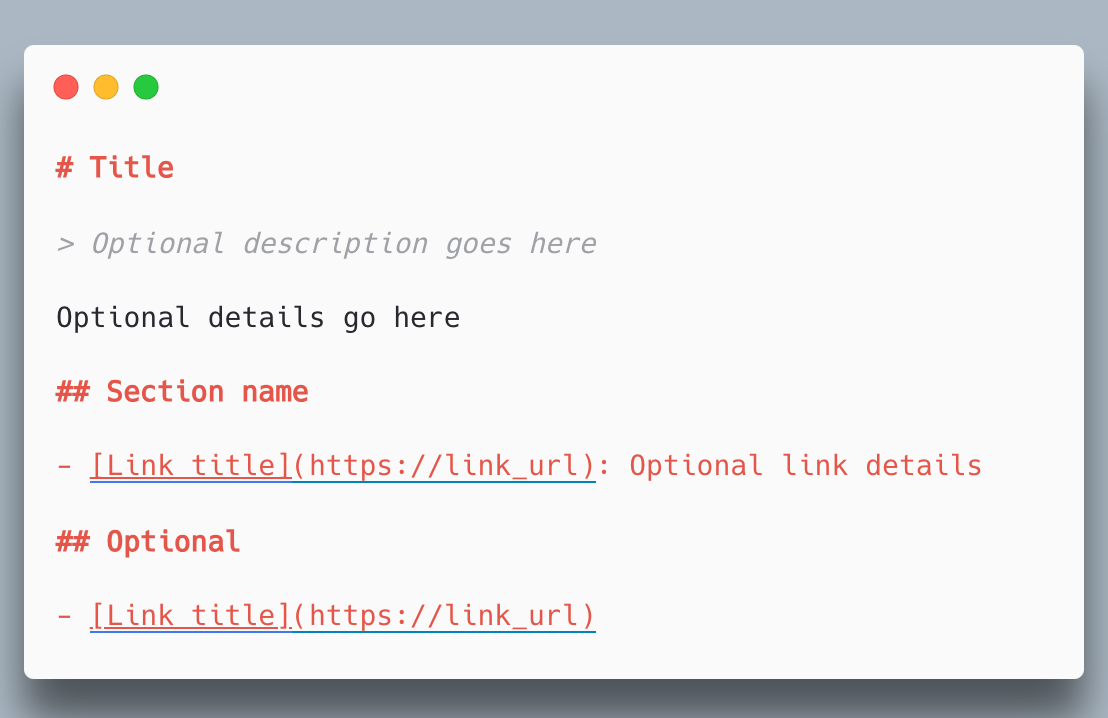
LLM向けのサイト説明ファイル。robots.txtのAI版:
# kt-tech.blog
> 実践的な技術記事とエンジニアリングの知見を発信
## Topics
- Next.js / React / TypeScript
- Cloudflare Pages / Workers
...
GCPサービスアカウントでSearch Console APIに接続。検索パフォーマンスとインデックス状況をAPI経由で取得。sitemapの再送信もAPIで実行。
デプロイ後にGoogle/Bingにsitemap更新を自動通知:
- name: Notify search engines
  run: |
    curl -s "https://www.google.com/ping?sitemap=https://kt-tech.blog/sitemap.xml"
    curl -s "https://www.bing.com/ping?sitemap=https://kt-tech.blog/sitemap.xml"
next-sitemapはEdge Runtimeの動的ルートを拾わない。App Routerのsitemap.tsが正解
Indexing APIは一般ブログでは使えない(JobPosting専用)。sitemap再送信+Pingで対応
AIクローラーの許可は明示的に書く。デフォルトでブロックされるサイトが多い
sitemapを7件→61件にURL数増加
AIクローラーを明示的に許可 + llms.txt追加
Search Console APIでインデックス状況を監視
デプロイ毎にGoogle/Bingに自動通知
この記事が役に立ったら共有しよう

Koki
フルスタックエンジニア / React, Next.js, TypeScript